When I click on a day in the Day Level, it doesn't show the table, but I've already added a dd() function to display the data and it loads in the dd() function, but the table doesn't load.
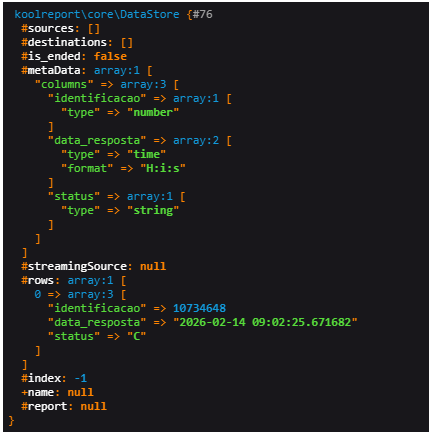
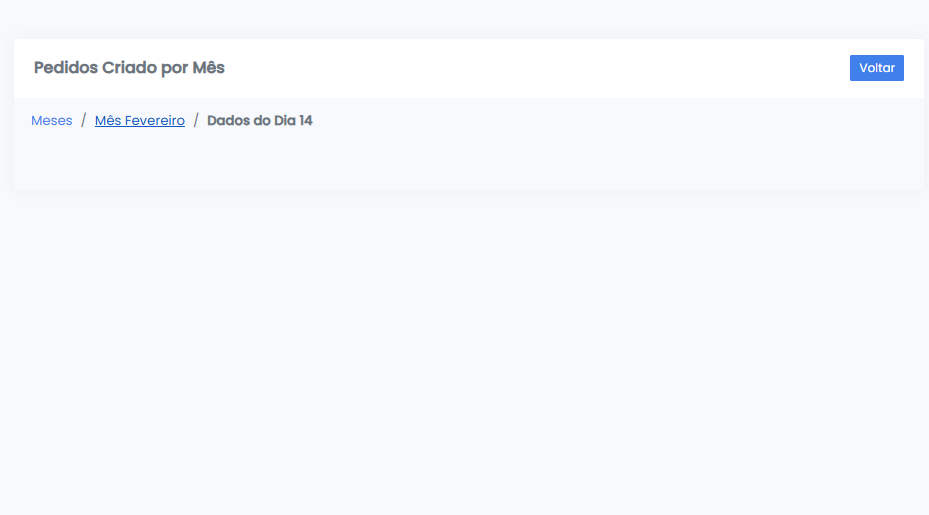
I want you to explain how I can generate the table, if there are any errors in my code, and what I can do to make the table appear along with the data I showed in the image above.
This is indeed the problem I'm facing; the data is arriving correctly, but the table isn't showing up at the last level.
<?php

namespace App\Dashboard\TCU;

use Database\AutoMaker;
use \koolreport\dashboard\widgets\drilldown\DrillDown;
use \koolreport\dashboard\widgets\drilldown\Level;
use \koolreport\dashboard\widgets\KWidget;

class DrillDownDemo extends DrillDown
{
    use \koolreport\dashboard\TWidgetState;

    protected function onInit()
    {
        $this->settings([
            "global" => [
                "_token" => $this->app()->csrf()->token(),
            ],
            "title" => "Pedidos Criado por Mês",
            "icon" => "fa-solid fa-chart-simple",
            "type" => "primary",
            "updateOn" => "5min",
            "cache" => "5min",
            "updateOnNextLevel" => true
        ]);
    }

    protected function levels()
    {
        return [

            Level::create()
                ->title("Meses")
                ->widget(
                    KWidget::create()
                        ->use(\koolreport\widgets\google\ColumnChart::class)
                        ->dataSource(function($params,$scope){

                            return AutoMaker::table("tb_pedidos ped")
                                ->selectRaw("
                                    extract(month from ped.data_resposta) as mes_num,
                                    to_char(ped.data_resposta, 'TMMonth') as mes
                                ")
                                ->count("ped.identificacao")->alias("total")
                                ->whereRaw("extract(year from ped.data_resposta)=2026")
                                ->where('ped.fk_cliente',111111111)
                                ->whereIn('ped.status',['C','P'])
                                ->groupByRaw("mes_num, mes")
                                ->orderBy("mes_num")
                                ->run();
                        })
                        ->columns([
                            "mes"=>[
                                "type"=>"string",
                                "label"=>"Mês"
                            ],

                            "total"=>[
                                "type"=>"number",
                                "label"=>"Pedidos"
                            ],

                            "mes_num"=>[
                                "type"=>"number",
                                "role"=>"annotation"
                            ]
                        ])
                ),

            Level::create()
                ->title(function($params){
                    return "Mês ".$params["mes"];
                })
                ->widget(
                    KWidget::create()
                        ->use(\koolreport\widgets\google\ColumnChart::class)
                        ->dataSource(function($params,$scope){
                            $anoAtual = date("Y");

                            return AutoMaker::table("tb_pedidos ped")
                                ->selectRaw("
                                    extract(day from ped.data_resposta) as dia_num,
                                    'Dia ' || extract(day from ped.data_resposta) as dia
                                ")
                                ->count("ped.identificacao")->alias("total")
                                ->whereRaw("extract(year from ped.data_resposta)=".$anoAtual)
                                ->whereRaw("extract(month from ped.data_resposta)=".$params["mes_num"])
                                ->where('ped.fk_cliente',1111111)
                                ->whereIn('ped.status',['C','P'])
                                ->groupByRaw("dia_num, dia")
                                ->orderBy("dia_num")
                                ->run();
                        })
                        ->columns([
                            "dia"=>[
                                "type"=>"string",
                                "label"=>"Dia"
                            ],

                            "total"=>[
                                "type"=>"number",
                                "label"=>"Pedidos"
                            ],

                            "dia_num"=>[
                                "type"=>"number",
                                "role"=>"annotation"
                            ]
                        ])
                ),
            Level::create()
                ->title(function($params){
                    return "Dados do ".$params["dia"];
                })
                ->widget(
                    KWidget::create()
                        ->use(\koolreport\dashboard\widgets\Table::class)
                        ->dataSource(function($params,$scope){
                            $anoAtual = date("Y");

                            $dados = AutoMaker::table("tb_pedidos ped")
                                ->selectRaw("
                                    ped.identificacao,
                                    ped.data_resposta,
                                    ped.status
                                ")
                                ->whereRaw("extract(year from ped.data_resposta)=".$anoAtual)
                                ->whereRaw("extract(month from ped.data_resposta)=".(int)$params["mes_num"])
                                ->whereRaw("extract(day from ped.data_resposta)=".(int)$params["dia_num"])
                                ->where('ped.fk_cliente',11111111)
                                ->whereIn('ped.status',['C','P'])
                                ->run();
                            return $dados;
                            // return dd($dados);
                        })
                        ->columns([
                            "identificacao"=>[
                                "type"=>"string",
                                "label"=>"Pedido"
                            ],

                            "data_resposta"=>[
                                "type"=>"datetime",
                                "label"=>"Data Resposta"
                            ],

                            "status"=>[
                                "type"=>"string",
                                "label"=>"Status"
                            ]
                        ])
                )
        ];
    }
}